
Can you see who views your videos on tiktok? Yes, partly. Accounts aged 16 or older with fewer than about 5,000 followers can see a partial list of viewers for posts from the last 7 days, and everyone else sees counts and analytics only.
If you film several takes a day and would rather post than trim, upload a raw take and get the first clip cut free, no card. The rest of this article covers the viewer list, the phone steps, and the numbers that are more useful than names.
Facts below come from the four sources listed at the end, all fetched on 2026-10-29. TikTok menus change, so confirm each step in your own app before you rely on it.
Can you see who views your videos on tiktok: the rules
Post View History is the feature that shows names. Per async.com and Descript, it has three conditions:
- You are 16 or older.
- You have fewer than about 5,000 followers.
- The post went up in the last 7 days.
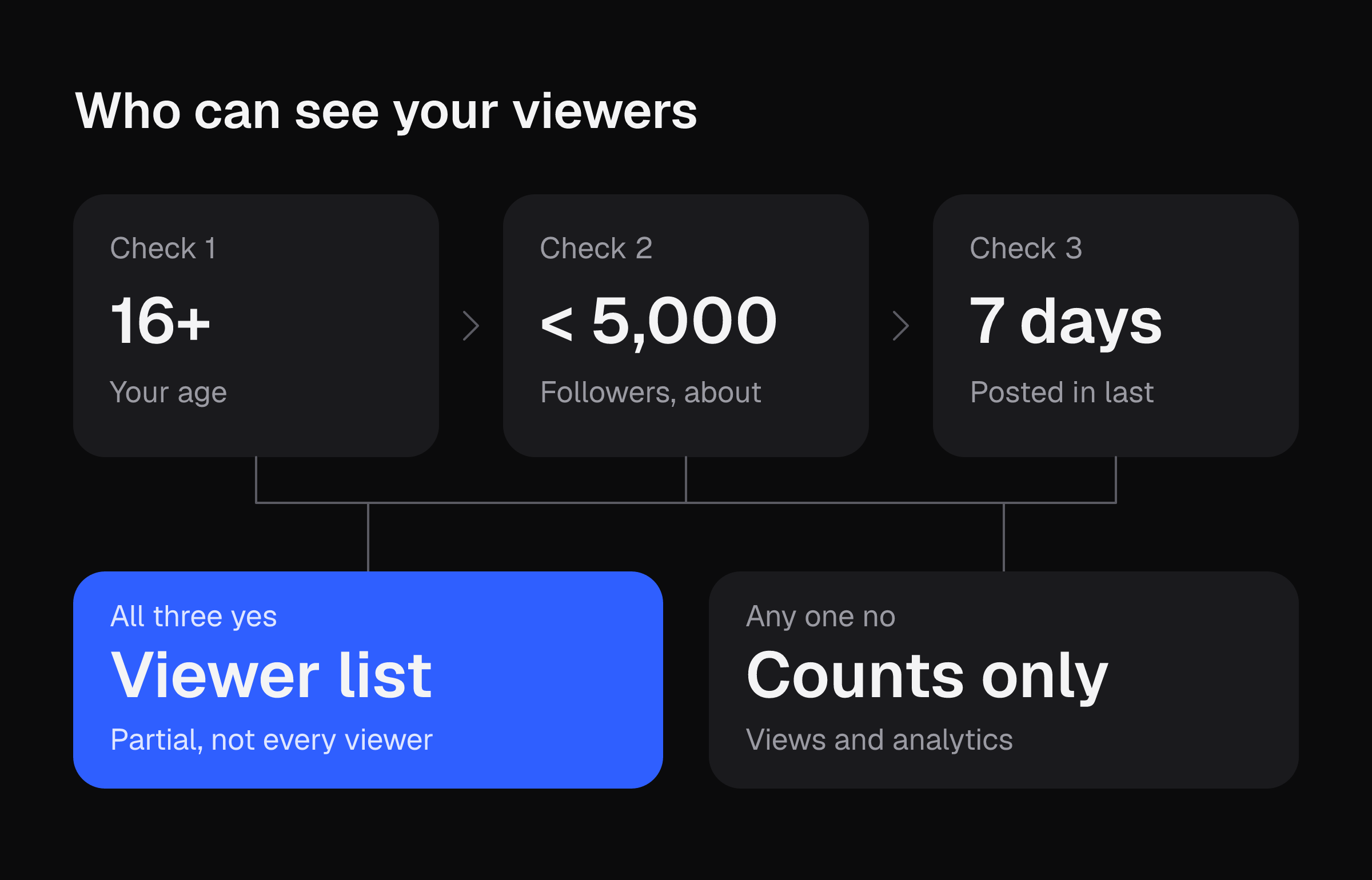
The sources word the follower limit differently. Async says "5,000 or more" loses access. Descript says "more than 5,000". The exact-5,000 case is unverified, so check your own account.
The list is partial by design. Per async.com it can include:
- Followers who turned the setting on and viewed the post.
- Non-followers who liked or commented, whether or not they have the setting on.
A long view count next to a short viewer list is normal. Most views never show up as a name.
Turning it on works both ways
Per Descript and multilogin.com, switching on post view history or profile view history lets other people see when you view their videos or profiles. Per async.com, viewing a public profile usually goes unnoticed unless you interact. A like or a comment shows up to the creator as a view even with the setting off.
Where the sources disagree
Descript says video views are never itemized: you get a count, not accounts. Its own steps also describe seeing who watched a specific video. Both fit together this way: names appear only through the partial Post View History list, and only for eligible accounts. Descript also says anyone claiming to reveal who watched a specific video is selling something. Skip third-party viewer tools.
Profile views and Stories are separate
Profile views are a different list from video views. Per async.com, Descript and multilogin.com:
- Profile View History is off by default.
- It covers visits in the last 30 days and does not show visits from before you turned it on.
- It only lists accounts that also have it on. Private accounts and people with it disabled never appear.
Multilogin says there are no automatic profile-view notifications as of 2026. If you see no profile views, the usual causes are the setting being off, 5,000 or more followers, an account under 16, or an app that needs an update.
Stories last 24 hours. Swipe up on your Story to see the viewer list. Per async.com, TikTok says people can see that you viewed their Story even if your account is private.
Worked example: the 7-day window as an editing budget
Post View History covers only the last 7 days. That makes the window a simple count of videos you can still check.
Both inputs below are your own assumptions. No source gives a posts-per-day figure or a trim time. The numbers in the table are illustrative, so swap in yours.
- Pick your posts per day. Example: 3.
- Multiply by 7 for the videos still inside the window. 3 × 7 = 21.
- Pick your minutes of hand-trimming per take. Example: 10.
- Multiply for weekly editing time. 21 × 10 = 210 minutes, or 3 hours 30 minutes.
| Posts per day (your input) | Videos in the 7-day window | Trim minutes per take (your input) | Weekly trimming time |
|---|---|---|---|
| 1 | 7 | 10 | 70 min |
| 3 | 21 | 10 | 210 min |
| 5 | 35 | 10 | 350 min |
Two things follow from the arithmetic:
- Names cover a small, partial slice of those 21 videos and then expire. Your analytics give counts and retention numbers for every one of them, so read those.
- A batch of 21 gives you a better comparison than 3 videos. The minutes per take decide how big a batch you can afford to post.
Your own trim time is the number to measure. Time one take from raw footage to postable, then run the table with that figure. If the weekly total is higher than you want, upload a raw take and the first clip is cut free, no card, then compare the minutes.
Phone steps: viewer history, view count, More insights
1. Turn on Viewer history
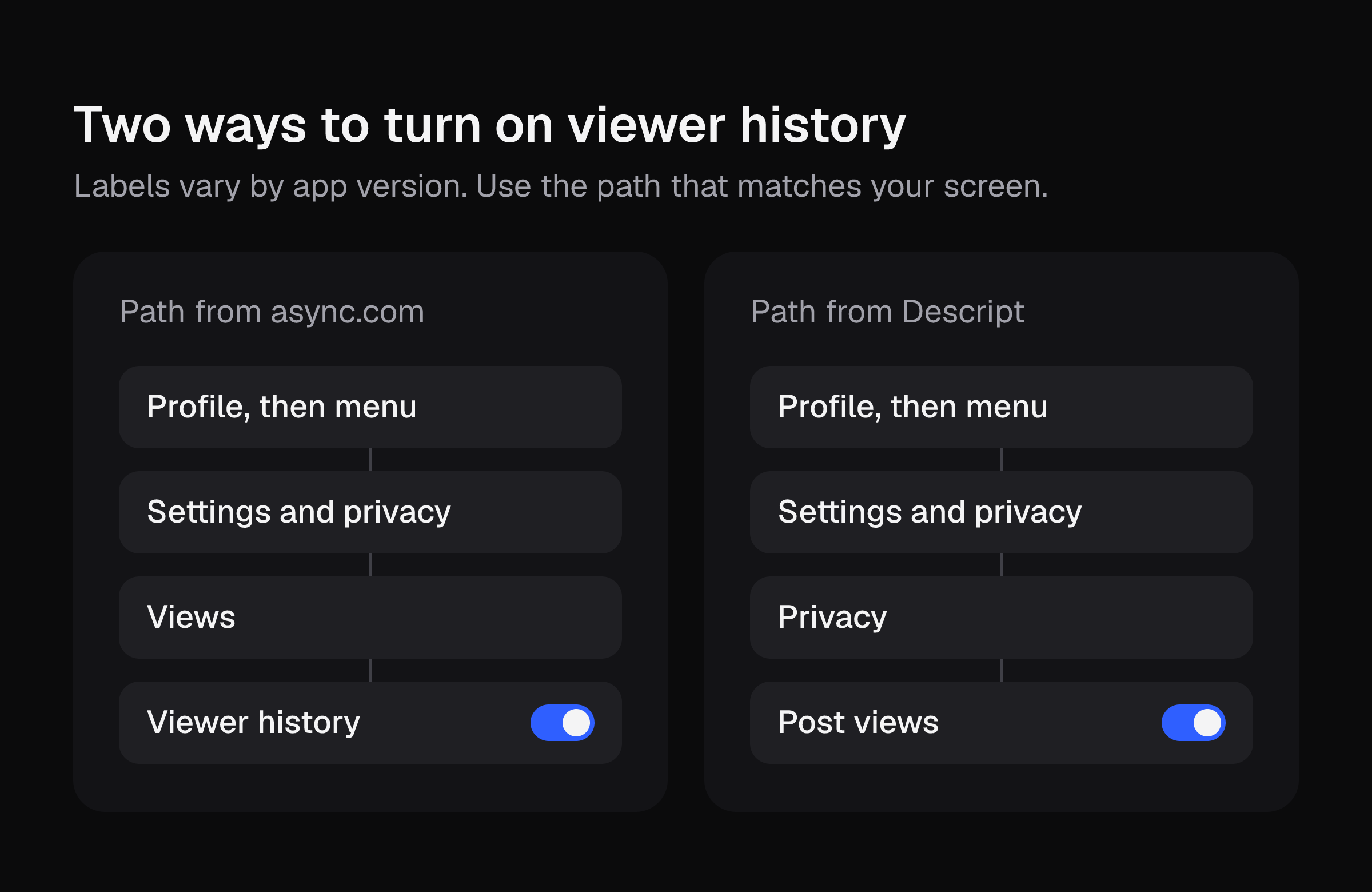
Async.com gives this path:
- Tap Profile, then the menu (three lines).
- Tap Settings and privacy.
- Tap Views.
- Switch on Viewer history.
Descript gives a different path: Profile, menu, Settings and privacy, Privacy, then the Post views toggle. Labels vary by app version, so use whichever matches your screen.
2. Open a video's view count
- Go to your profile and tap a video posted in the last 7 days.
- Tap the view count at the bottom-left of the video (Descript's check).
- If your account is eligible, the partial viewer list opens here.
If no list appears, check your age, your follower count and the setting from step 1.
3. Open More insights
Per streamer.guide, the path is Profile, Menu, TikTok Studio, Analytics. For one post, tap More insights at the bottom of the post.
TikTok Studio shows totals, not names (async.com). Native analytics cannot show anyone else's account (streamer.guide).
What to read instead of names
Streamer.guide advises planning around about 60 days of history, so do not count on old numbers staying available.
Async.com says analytics show the video retention rate and the share who watched the full video. It also says retention data can show where viewers stop watching, and you can fix that through editing. Streamer.guide says TikTok's guidance is that finishing a longer video is a strong signal of interest. None of this promises views, followers or sales. It tells you which of your own takes held attention.
A weekly routine that fits the 7-day viewer window:
- Once a week, open the analytics for each video you posted.
- Write down average watch time and the full-watch share for each video in a note.
- Sort the list and compare the top three against the bottom three.
The note keeps your numbers after the analytics move on. For a fuller weekly routine, see TikTok Analytics for Affiliates. If a video sits near zero, Why Does My TikTok Have 0 Views? walks through the checks.
If you have about 5,000 followers or more
You lose the viewer list but keep other signals. Per Descript, you can check:
- Who liked the post. Tap the heart icon on the post. This works for all users regardless of follower count.
- Who commented.
- Who interacted through stitches or duets.
The people on those lists are a small share of your viewers. Use them to find repeat engagers, and use retention numbers for the rest.
The biggest input to every figure above is how many takes you post. For the trimming side, How to Edit TikTok Videos lists the phone steps and their time cost. When you want a take trimmed without doing it yourself, upload a raw take and get your first clip cut free, no card.