TikTok has no public tiktok live archive of other people's LIVEs. You can rewatch and download your own replay, and per TSL Agency it stays available for 30 days.
The source wording differs on one point. LiveRec says TikTok deletes a LIVE the moment it ends unless you turned on Save LIVE Replay before going live. TikMonitor says the same and adds that the setting is off by default. Treat it as a pre-live step: switch the replay on first, or there may be nothing to download.
Once you have the file, you have raw footage to cut. Upload a raw take and get the first clip cut free, no card.
How to find your own tiktok live archive on your phone
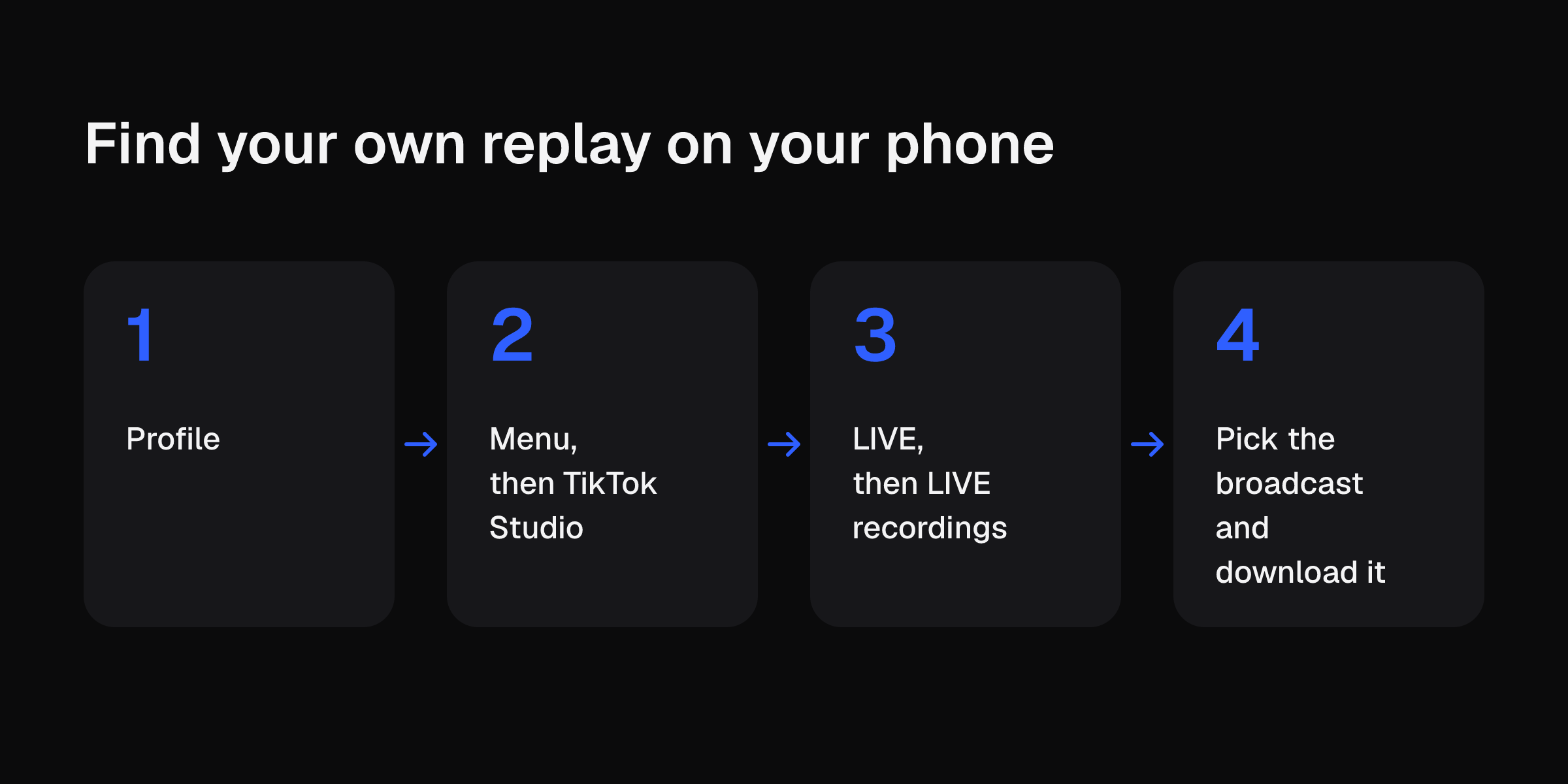
These are the steps from TSL Agency:
- Open TikTok and go to Profile.
- Tap Menu, then TikTok Studio.
- Tap LIVE, then LIVE recordings.
- Pick the broadcast and download it.
If the recording is missing, check you are logged into the account that hosted the LIVE. A broadcast older than 30 days may no longer be available.
The seller-side route: LIVE Highlights
TikTok Seller University describes LIVE Highlights. These are the points from that page:
- Go to LIVE Center, then LIVE recordings, and use the download button at the bottom.
- LIVE Highlights is open to affiliate creators with no store rating limit.
- Without auto-post, the system gives up to 6 highlight clips per LIVE.
- There is no minimum LIVE length. TikTok recommends 1 to 2 hours and pinning at least 3 different products.
- A highlight clip lasts 30 days after the LIVE ends. An accidental deletion cannot be undone.
- You can change the linked product when you repost it as a short video.
Download early
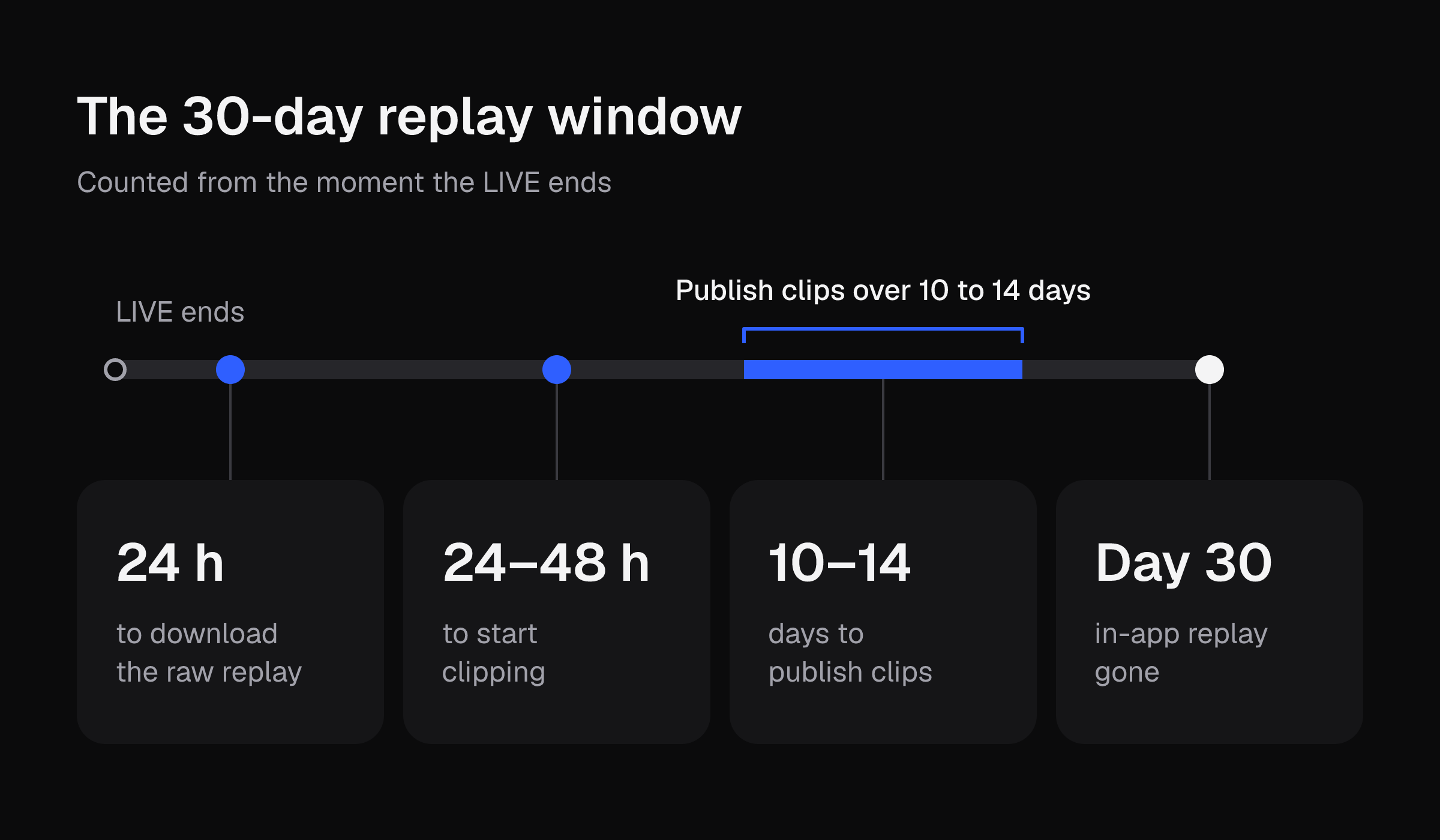
Influencers Time says to pull the raw replay within 24 hours and start clipping within 24 to 48 hours. TSL Agency says to download high-value broadcasts within a day or two. A downloaded file is separate from the in-app recording, so the 30-day limit stops pressuring you once it is on your phone.
Influencers Time also says most TikTok Shop LIVEs get 80% of their sales in the first three hours, and the replay is then usually left alone. It says a 60-minute LIVE can realistically yield 8 to 15 clip-worthy segments. That is footage you already filmed.
Worked example: one 60-minute LIVE
Take one 60-minute LIVE. The planning figures are 3 to 5 candidate clips per hour of footage, 15 to 45 seconds each, published over 10 to 14 days, all inside the 30-day replay window.
| Plan | Clips | Length each | Finished video | Spread over | One clip every |
|---|---|---|---|---|---|
| Low end | 3 | 15 s | 3 × 15 s = 45 s | 14 days | about 4 to 5 days |
| High end | 5 | 45 s | 5 × 45 s = 3 min 45 s | 10 days | 2 days |
Read the table this way. An hour of LIVE footage needs between 45 seconds and 3 minutes 45 seconds of it. The rest stays unused. The posting rhythm is one clip every 2 to 5 days, which is light.
Your own cost is the part to measure:
- Pick one clip from your replay and trim it by hand on your phone. Time it from start to export.
- Write that number down: ___ minutes.
- Multiply by 3 for the low end and by 5 for the high end: ___ and ___ minutes per LIVE.
I left the blank on purpose. Your trim time depends on your phone, your app and how much you ramble. Time your own trim of one take before you decide how many clips a LIVE is worth.
If that number is bigger than you expected, upload a raw take and get the first clip cut free, no card. This site's editor accepts a take up to 5 minutes long and up to 2 GB, so a 60-minute replay needs a segment pulled out before you upload it.
Pick moments worth clipping
Influencers Time suggests timestamp markers from the live chat. Spikes in comments or add-to-cart activity usually flag the strongest moments.
TSL Agency suggests a short audit note per video:
- Best moment
- Weakest moment
- Top customer questions
- Strongest product
- Sales spike timestamp
- Next test
It also suggests file names with the date, product range, host, campaign and main result. That helps when you hunt for a clip three weeks later.
Decide how much to cut by performance
Influencers Time sorts LIVEs by how they performed:
| LIVE result | Cuts to make |
|---|---|
| Above average | 8 to 15 cuts |
| Mid-performing | 2 to 4 cuts on the clearest sales moments |
| Underperforming | Archive it, spend no editing time |
It suggests tracking clip-attributed GMV separately for 30 days before you build a permanent workflow. Your TikTok analytics review is the place to check that weekly.
Check these before you repost
A private replay does not automatically become a public product video. TSL Agency and Influencers Time list these checks:
- Remove customer details, sensitive information, awkward comments and third-party appearances.
- Reaffirm any paid-partnership or affiliate disclosure in the re-edited clip. It is not assumed to carry over.
- Read your agreement. Some creator contracts pay only for the live event itself, and some brands are adding replay-clipping usage-rights clauses.
Influencers Time also recommends re-captioning clips for sound-off viewing. Do that in a separate captioning step. This site's editor does not add captions, music, b-roll, effects or transitions.
What about lives you did not host?
Recorder services such as TikMonitor and LiveRec exist for other people's lives. According to TikMonitor, a LIVE nobody recorded while it aired cannot be recovered. Check each tool's current terms and prices on its own site before you pay.
Next steps for your next LIVE
Before you go live, turn on Save LIVE Replay. Our how to go live on TikTok steps cover the rest of the setup. For the length of each clip you post, see how long a TikTok video can be. For the manual route, see how to edit TikTok videos.
After the LIVE, download the replay within 24 to 48 hours, pick your 3 to 5 moments, and upload a raw take to get the first clip cut free, no card.