If you searched "tiktok live backstage", here is the answer. Backstage is a creator management platform for Creator Networks (agencies) that support LIVE creators, per TikTok's LIVE Agency Onboarding Criteria-US. A solo affiliate applies a different way: in TikTok Studio, under Monetization.
Upload a raw take to this site's editor and the first clip is cut free, no card needed.
Below: what Backstage asks of a network, the steps you follow on your phone, and a schedule built from TikTok's own pilot limits. All TikTok figures were checked on October 30, 2026. Rules change, so confirm the numbers inside your own Shop account.
What the tiktok live backstage application requires
The Agency Onboarding Criteria-US page lists who can apply:
- A Creator Network in the U.S. or Canada.
- A corporate entity registered in the U.S. or Canada.
- A corporate bank account in the network's own name, in the U.S. or Canada.
- Local operation.
- A signed Services Agreement with TikTok once approved.
Meeting those requirements does not guarantee access. TikTok reviews motivation, capabilities and experience through documentation and interviews. Networks with successful experience in related industries get priority, and applicants may be asked for supporting documents.
A solo creator has no corporate entity or network to put on that form. Skip it and use the route below.
The route solo affiliates use
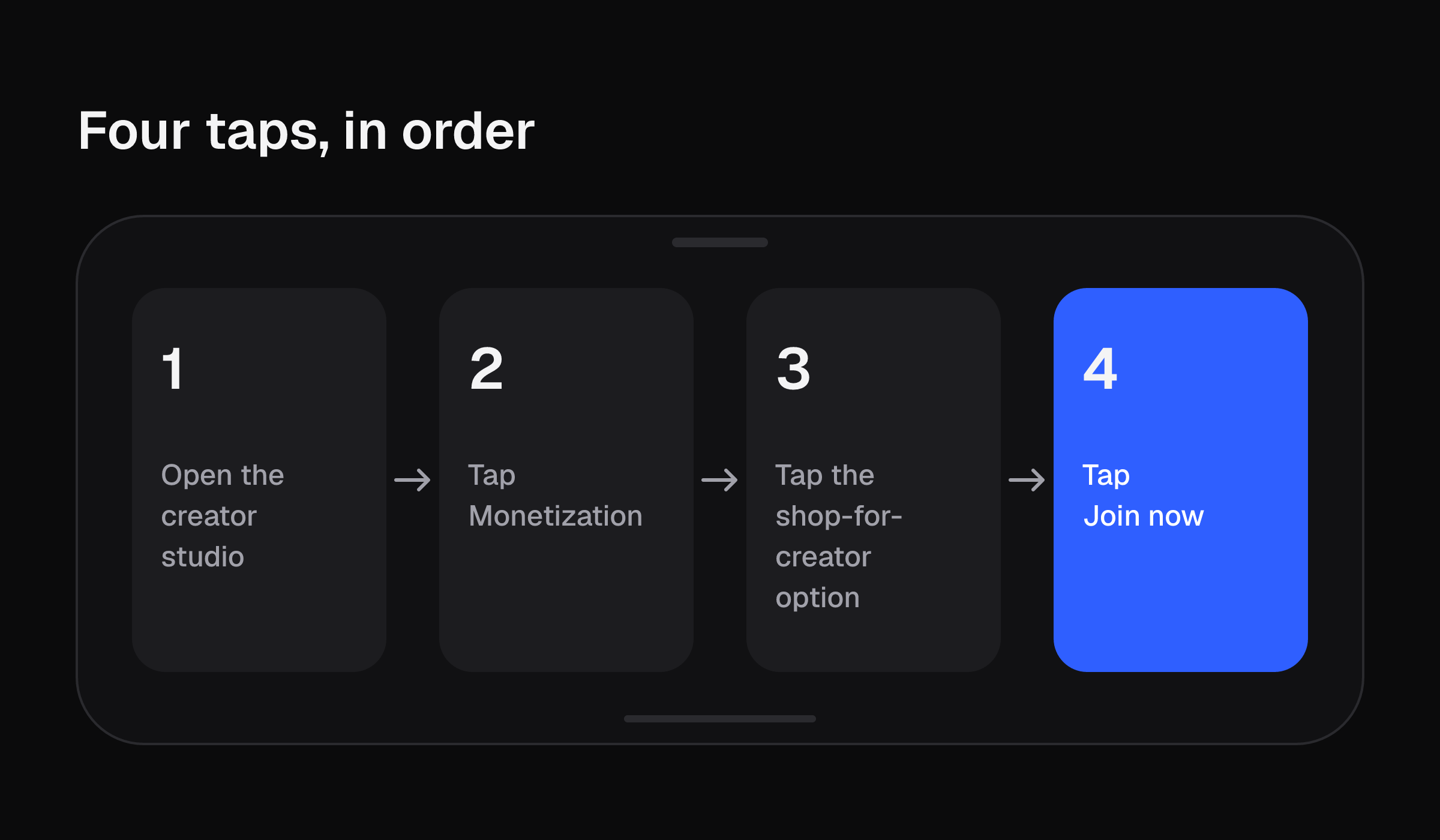
Apply in TikTok Studio on your phone:
- Open TikTok Studio.
- Tap Monetization.
- Tap TikTok Shop for Creator.
- Tap Join now.
TikTok's seller university pages give the entry rules for affiliates: at least 1,000 followers, you must self-apply, and you must be at least 18. You earn commission on orders that come through shoppable videos, LIVEs or sharable affiliate links. The same pages do not give a commission rate in the pages used here, so this article does not either. Read the rate on each product in your own account.
Two checks to expect after you apply:
- Age. Affiliate and Marketing creators must confirm age within 2 months of registration. Age confirmation allows up to 15 attempts, depending on the method.
- Identity. ID image verification allows up to 10 attempts. Product links may be hidden from viewers while identity verification is in progress.
For the full join flow, see the TikTok Shop affiliate program guide.
Pilot limits and graduation numbers
New creators can start in a pilot with caps. TikTok's pages disagree slightly, so each figure is tied to its source.
| Limit | Figure | Source |
|---|---|---|
| Shoppable product videos | Up to 3 per day | Creator Eligibility Policy |
| Shoppable LIVEs | Up to 3 per week | Creator Eligibility Policy |
| Shoppable LIVEs, Extended Pilot Creators | Up to 1 per week | Creator Eligibility Policy |
| Shoppable videos, creators under 5,000 followers | Up to 5 per week | What You Need to Know Before Becoming a TikTok Shop Creator |
The Creator Eligibility Policy also says newly onboarded Official Creator and Marketing Creator accounts may enter an Early-Stage Pilot of at least 30 days, with up to 3 e-commerce videos per day. Effective May 11, 2026, TikTok Shop introduces daily posting limits for shoppable content for all US merchants and creators. Pilot creators only see products with a Shop Performance Score of 95% or higher, and cannot join campaigns.
To graduate you need at least 5,000 followers and at least 30 days onboarded, plus one of these:
- Publish at least 6 e-commerce videos of at least 8 seconds each.
- Run 1 e-commerce LIVE of at least 5 minutes.
- Get 10 orders in the past 30 days, excluding fake orders.
Pilot creators must also pass the Pilot Program Quiz. The Creator Eligibility Policy lists early graduation routes too. One needs at least 1 LIVE of at least 5 minutes, passing the probation quiz, and 176 Creator Health Rating points. Another needs 10 orders through shoppable content.
What counts toward the cap
- A deleted shoppable video still counts toward the weekly limit.
- Regular short videos with no product link do not count.
- Adding a product link to a video you already posted makes it shoppable, and it counts.
Worked example: takes to film for the 6-video option
Take the video route to graduation: 6 e-commerce videos, each at least 8 seconds. That is 6 talking-head takes to film and trim. The caps decide how fast you can post them.
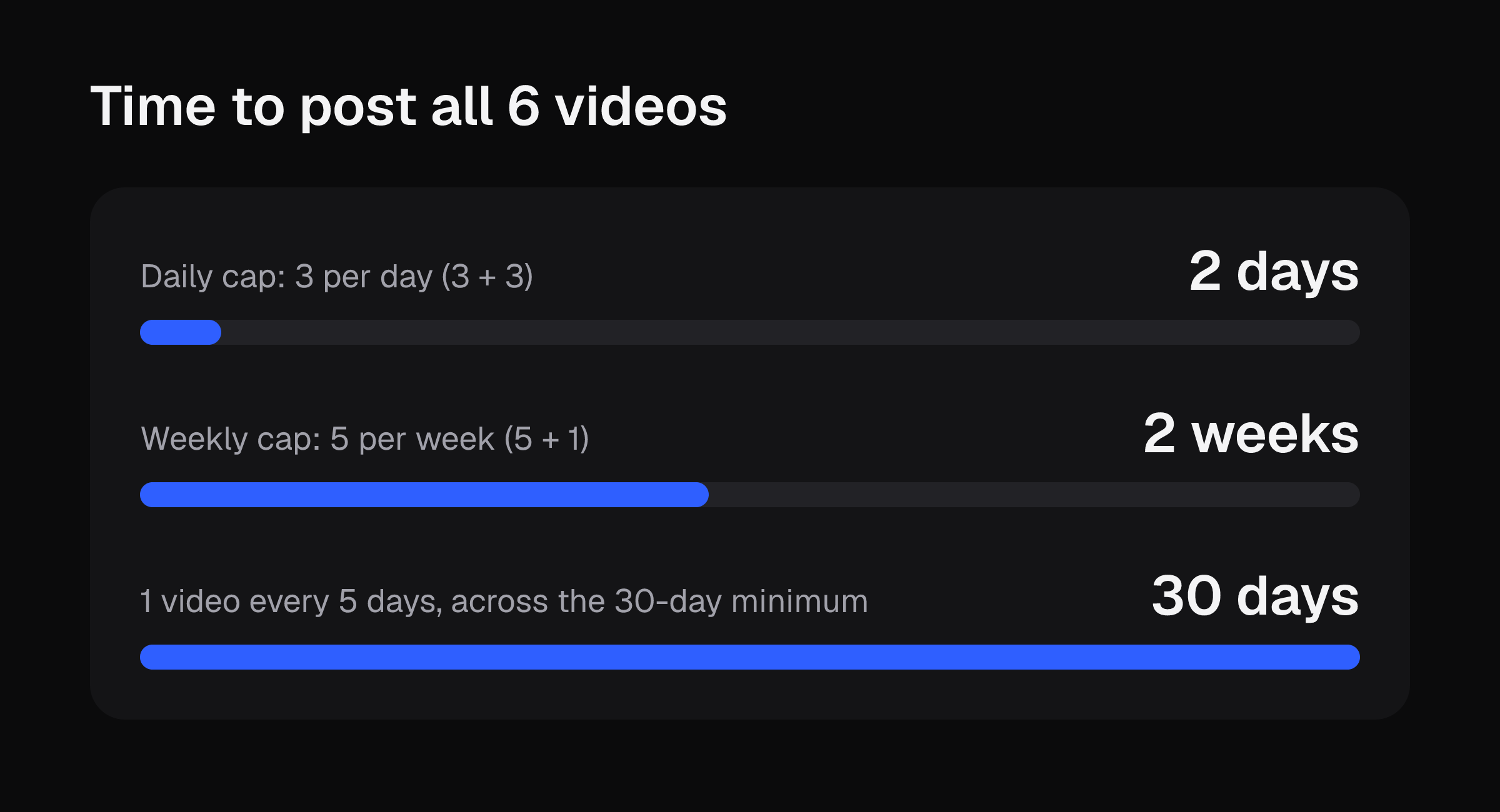
| Schedule | Cap used | Videos posted | Time to post all 6 |
|---|---|---|---|
| Daily cap | 3 per day | 3 + 3 | 2 days |
| Weekly cap | 5 per week | 5 + 1 | 2 weeks |
| Spread across the 30-day minimum | 1 video every 5 days | 6 | 30 days |
Add a deleted video and the count moves. Post 7 and delete 1, and you used 7 slots: 3 days at 3 per day (3 + 3 + 1), or 2 weeks at 5 per week.
The posting window is short. The 5,000 followers and the 30 days onboarded are what set your graduation date.
Now put your own trim time in:
- Film one talking-head take on your phone.
- Start a timer. Trim it by hand: cut the pauses, the "um"s, the retakes and any spoken slate.
- Stop the timer. Call that number T minutes.
- Multiply: 6 × T is your hand-trim time for the 6-video option.
- If you plan 7 posts to leave room for a deleted one, use 7 × T.
That total is the editing cost of one graduation. A year of daily posting repeats it many times over. For a phone-only comparison of editing methods, read how to edit TikTok videos.
Once you have your T, upload a raw take to this site's editor and get the first clip cut free, no card needed.
Prep for a LIVE on your phone
If you take the 1-LIVE graduation option, these steps come from Elgato's live selling guide, last updated October 13, 2026:
- Mount the phone on a tripod at chest to eye height.
- Frame vertically, with space above your head and in front of your chest. The TikTok safe zone template shows where the app's buttons sit over the frame.
- Do not sit with a bright window behind you.
- Record a 30-second test and play it back. If it sounds distant, TikTok is using the built-in mic.
- Clip a lavalier mic about a hand's width below your chin.
- Turn on Do Not Disturb.
- Hold each product still for a second or two so the camera can focus.
Elgato also states the rules for a Shop LIVE. Streams must be live and interactive. Looping a pre-recorded video or a static image as the main feed goes against TikTok Shop's LIVE guidelines. In the US a seller must be 18 or older and US-based to sell during a LIVE. There is no follower minimum if a TikTok Shop seller invites you to promote their products.
For the go-live taps themselves, see how to go live on TikTok.
Next step
Film your timing take today, write down T, and fill in the table for your own cap. Then upload a raw take to this site's editor and get the first clip cut free, no card needed.